Shadow of the Orient – a pixel‑perfect side‑scrolling showdown
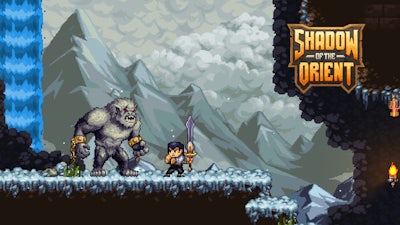
Step into a neon‑lit feudal Japan where every pixel tells a story. You play as a lone swordsman, cutting through waves of samurai and mythic beasts. The stakes? A dark lord threatens to swallow the realm. Your blade, your wits, and your grit are the only things standing between light and ruin. This 2D platformer doesn’t just look sharp—it feels razor‑fast, and every secret you uncover adds weight to the final clash.
Mechanics
Controls are tight, responsive, and fully customizable. Master the basics, then tweak the layout to suit any playstyle.
- Keyboard Controls
- WASD = move
- Space = jump
- Enter = attack
- Shift = dash
- C = switch
- F = skip dialogue
- Q = swap weapons
- You can change the controls as you like in the game settings.
- Mobile Controls
- Change the controls to mobile in the game settings. (Fixed / Dynamic / D-Pad)
Strategy
Start every level by scouting the layout. The side‑scrolling design rewards players who collect hidden scrolls and power‑ups before charging into combat. Upgrade your sword with elemental shards to break enemy armor faster. Remember, not every foe falls to a single slash—use dash to dodge heavy attacks and follow up with a quick combo. Boss encounters have tell‑tale patterns; watch the dark lord’s charge, sidestep, then strike the exposed core. Keep an eye on your stamina bar; a depleted dash leaves you vulnerable.
When you feel the grind setting in, head back to a previous act. The game’s sprawling map hides optional challenges that drop rare gear and extra lore. Mastering these side quests fuels your progression and makes the final showdown feel earned. And don’t forget the hidden Pixel collectibles—each one unlocks a new visual filter, letting you experience the Japanese aesthetic in fresh palettes.
Ready to slice through the darkness? Grab your controller, fire up Shadow of the Orient, and prove that a lone warrior can tip the balance. Agame’s latest title waits for players who crave precision, style, and relentless action.
You can change the controls as you like in the game settings.
Change the controls to mobile in the game settings. (Fixed / Dynamic / D-Pad)