City Coach Driving Games 3d – The Ultimate Bus Challenge on Agame
Strap in for a high‑octane city ride that feels like a real‑life bus route. City Coach Driving Games 3d puts you behind the wheel of five distinct buses, each with its own quirks. Every level throws a fresh obstacle—traffic jams, tight turns, night‑time glare. Master the routes, keep passengers safe, and rack up scores that put you on the leaderboard of 2025 games and 2026 games. This isn’t a casual stroll; it’s a pulse‑pounding test of timing, precision, and cool‑headed decision‑making.
Mechanics
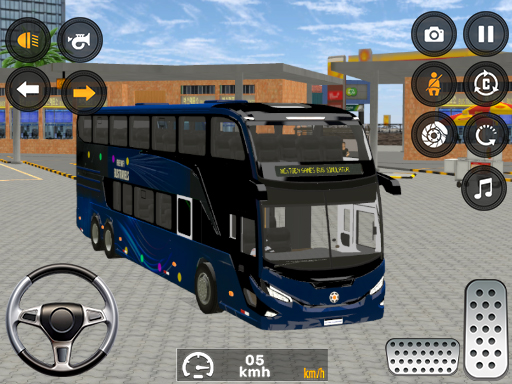
Controls are razor‑sharp and intuitive. On PC, you steer with WASD or the Arrow keys. Mobile players tap on‑screen buttons for steering, then hit the race button to speed up and the brake button to stop. The physics engine runs on WebGL, delivering buttery‑smooth 3D visuals that make every turn feel real.
- PC Use WASD or Arrow Keys to drive
- Mobile Use on-screen buttons to control the vehicle
- On Mobile Use race button to accelerate and brake button to stop
Strategy
Winning isn’t about raw speed; it’s about smart route planning. Start each level by scanning the map for shortcuts—sometimes the fastest path is a side street you’d normally avoid. Keep an eye on the passenger meter; a full bus slows you down, so drop off riders at the nearest stop. Night missions (Level 3) demand slower, steadier handling; use the headlights wisely and avoid sudden lane changes. Upgrade your bus with seat‑belt safety features to earn bonus points, and unlock new vehicles as you progress. The deeper you go, the more the game rewards efficient driving, making it a staple for anyone hunting free html5 games for your website or looking for fresh 3D Games content.
Ready to dominate the streets? Jump into the action, beat each level, and claim the top spot on Agame’s leaderboards. The city’s waiting—take the wheel now.
PC Use WASD or Arrow Keys to drive Mobile Use on-screen buttons to control the vehicle On Mobile Use race button to accelerate and brake button to stop